





If your web designer disappeared, you can usually recover your website. Start by checking WHOIS to confirm who actually owns your domain, gather proof you’re the business (SSM certificate, payment receipts, invoices), then contact the registrar directly instead of chasing the freelancer. For .my domains, MYNIC handles the transfer once you have documentation.
- Quick Takeaways
- What “Disappeared” Actually Means
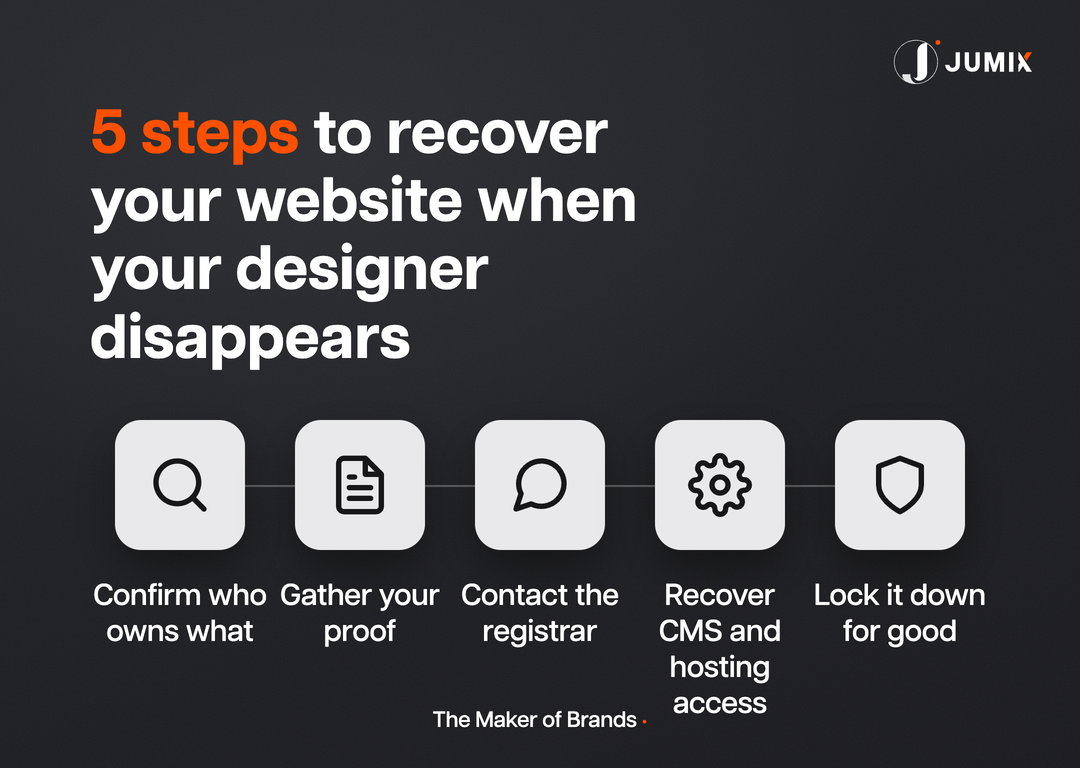
- Step 1: Confirm Who Legally Owns What
- Step 2: Gather Your Proof Before You Contact Anyone
- Step 3: Escalate Through the Registrar, Not the Freelancer
- Step 4: Recover Your CMS and Hosting Access
- Mistakes That Make Recovery Harder
- How to Make Sure This Never Happens Again
- FAQ
Quick Takeaways
- A WHOIS lookup tells you who is registered as the domain owner, before you contact anyone else.
- Your SSM certificate, payment receipts, and past invoices are the proof that gets a registrar to act.
- Call the registrar. Email tends to sit in a queue; a phone call gets a case number the same day.
- For .my domains, MYNIC runs the official transfer process once your documents check out.
- Locked-out CMS access is usually solvable through your host’s control panel, even without the original designer.
Your web designer stopped replying 3 weeks ago. Renewal is due next month. You don’t have the domain login, the hosting login, or a clear idea of who technically owns either one.
I’ve had this exact call more than once. Not as the vendor who vanished, as the agency a client turns to afterward. It’s fixable more often than business owners expect, and it’s fixable faster once you stop emailing the person who disappeared and start working the paper trail instead.
What “disappeared” actually means
“Disappeared” covers a few different situations, and each one changes your recovery path.
- Freelancer went quiet. Still technically reachable, just unresponsive. The mildest version, and often solved with the right escalation.
- Agency closed down. The business itself folded. No one to call, but usually a paper trail of invoices and a registrar who can still act.
- Domain or hosting registered under their name, not yours. The one that actually hurts. Legally, you may not be the account holder at all.
- Renewal lapsed and no one noticed. The domain is heading toward expiry, and the clock is now the main constraint, not the person.
Here’s the part that catches most business owners off guard: paying for a website every month for years doesn’t automatically make you the registered owner of the domain or hosting account. Ownership is whatever name sits in the WHOIS record and the hosting provider’s billing system, full stop.
Step 1: Confirm who legally owns what
Before you contact anyone, run a WHOIS lookup on your own domain. It shows the registrar, the registrant name, and the expiry date, which tells you exactly who you’re dealing with next.
Do the same check for hosting. Log into any hosting-provider email you can find (even an old one), or check your bank statement for the recurring charge; the merchant name usually reveals the host. If it’s a Malaysian host, their support line will confirm the account holder once you can prove your identity.
3 outcomes are possible here, and each sets your next move:
- You’re the registrant. You just lost the login. This is the easiest fix; skip to Step 4.
- The designer is the registrant, on your behalf. You’ll need to prove the business relationship and request a registrant transfer.
- Unclear or contested. Proceed to Step 2 and let the paperwork settle it.
Step 2: Gather your proof before you contact anyone

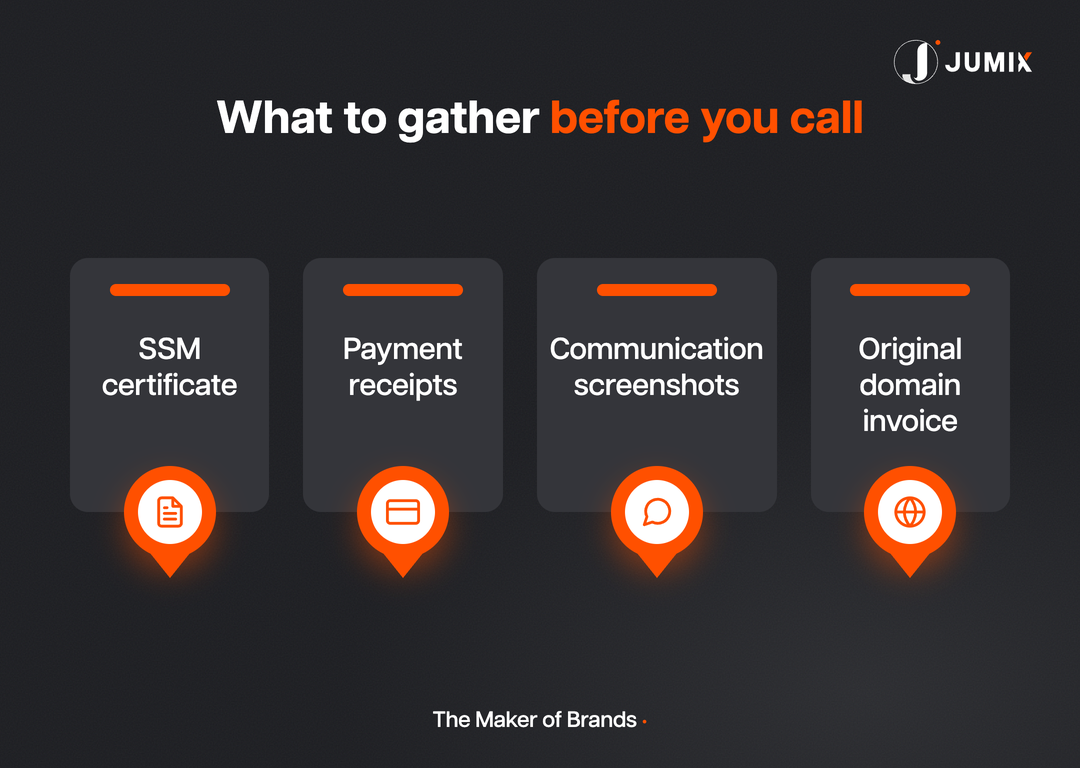
A registrar or hosting provider isn’t going to hand over an account on your word alone. They want documentation that ties your business to the asset in question. Have these ready before you make the call:
Your SSM certificate (or Form 9/Section 17 for a Sdn Bhd) proves your business is a real, registered entity, and that its name matches the domain or brand in question. Payment receipts and bank transfer records showing you paid for the domain, hosting, or design work establish the money trail. The original project invoice, ideally itemising “domain registration” or “hosting setup” as a line item, ties the vendor’s service directly to the asset. Screenshots of any communication, especially the ones where they promised to hand things over and then stopped responding, round out the picture.
If it were my money on the line, I’d spend an afternoon assembling this folder before making a single phone call. Registrars move fast for a business owner who shows up organised, and slow for one who shows up upset.
Step 3: Escalate through the registrar, not the freelancer
Stop emailing the person who went quiet. Every hour spent waiting on a reply that isn’t coming is an hour not spent on the path that actually works: the registrar.
For a .my domain, MYNIC (the official .my domain registry) runs a formal registrant-transfer process through its domain manager portal. Once your new administrative contact is submitted with supporting documents, MYNIC notifies both parties by email and processes the change on a set timeline (Source: MYNIC, mynic.my). Their FAQ page lays out the document requirements in more detail (Source: MYNIC, mynic.my).
For a .com, .net, or other generic domain, the process runs through whichever registrar shows up in your WHOIS lookup. Call their support line directly rather than emailing; phone support can open a case and flag it for manual review the same day.
| Domain type | Who to contact | Official process | Typical timeline |
|---|---|---|---|
| .my / .com.my | MYNIC (via your registrar or MYNIC directly) | Registrant transfer through MYNIC’s domain manager, with SSM and payment proof | Days to a few weeks, document-dependent |
| .com / .net / generic | The registrar shown in WHOIS (e.g. GoDaddy, Namecheap, Exabytes) | Ownership dispute case opened with the registrar’s support team | Days to a few weeks, registrar-dependent |
| Hosting account (any domain) | The hosting provider’s billing/support line | Identity verification, then account or access reset | Same day to a few days |
Keep every case number. If the first support agent can’t resolve it, the case number is what gets you to someone who can.
Step 4: Recover your CMS and hosting access
Ownership and login access are 2 separate problems. You can be the confirmed domain owner and still be locked out of WordPress.
Start with the basic password reset on your CMS login page. If the reset email never lands (a common outcome when the original admin email address belonged to the designer), your hosting control panel is the next stop; cPanel, Plesk, and most Malaysian hosting dashboards let you reset a WordPress admin password directly or create a new admin user through the database manager.
If you don’t have hosting access either, this is where the Step 2 documentation earns its keep again: hosting providers can verify ownership and reset the account for you once you prove it’s your business on the line.
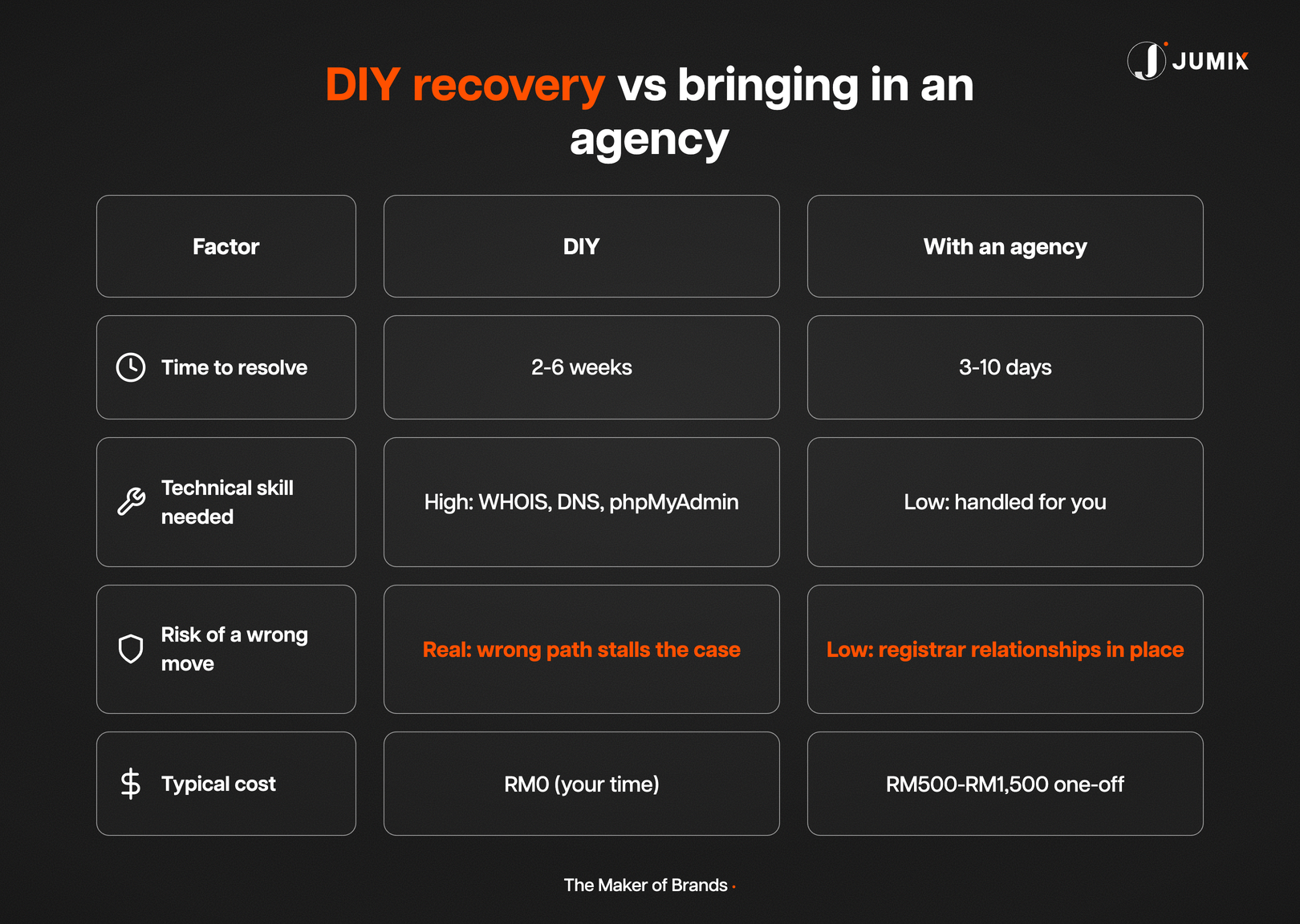
Some businesses handle all of this themselves over a weekend. Others call an agency the moment “WHOIS” starts sounding like a foreign language. Both are reasonable choices. The table above is just meant to help you pick which one fits your week.
Mistakes that make recovery harder
- Waiting past the renewal date. An expired domain can be released and re-registered by anyone. Everything gets harder, and sometimes impossible, once that happens.
- Only emailing, never calling. Registrar support queues are triaged. A phone call skips the queue.
- Threatening legal action before gathering proof. Support agents can’t act on threats. They act on documentation.
- Assuming the domain registrar and the hosting provider are the same company. They’re frequently different vendors, with separate logins and separate recovery processes.
- Rebuilding from scratch instead of recovering first. A full rebuild costs more than most recovery cases, and you may still need the old domain for SEO and existing backlinks.
How to make sure this never happens again
The fix for next time is boring, which is exactly why most businesses skip it: register your own domain under your own business’s SSM name. Your designer or agency should work inside accounts you control, not the other way round.
This single habit prevents more website disasters than any backup plugin or security scan. A vendor who disappears from an account they never controlled leaves your website exactly where it was. A vendor who disappears from an account they did control leaves you writing an article like this one to figure out what to do next.
Ask whoever manages your website today for read-only access to your own domain registrar. If they hesitate, that hesitation is your answer.
FAQ
Can I get my domain back if my web designer registered it under their own name?
Usually yes, through a registrant transfer with proof of your business relationship: SSM certificate, payment records, and invoices. For .my domains, MYNIC processes this transfer once documentation is submitted.
What happens if my domain expires before I recover it?
An expired domain enters a grace period before it’s released for public registration. Contact the registrar immediately once you notice the lapse; recovery during the grace period is far more straightforward than trying to reclaim a domain someone else has already registered.
Do I need a lawyer to get my website back?
Not for most cases. Registrars and hosting providers resolve the majority of these disputes through their own verification process. Legal involvement is usually only needed if the vendor actively disputes your ownership claim.
How long does it take to recover a hijacked or inaccessible website?
Simple login resets can be same-day. Registrant transfers through MYNIC or a generic registrar typically take a few days to a few weeks, depending on how quickly you can supply documentation.
Should I rebuild my website instead of recovering the old one?
Recover first. Your existing domain carries SEO value, backlinks, and Google Business Profile connections that a fresh domain starts without. Rebuild the design once you own the account, not before.
Conclusion
Losing access to your own website feels bigger than it is. In almost every case, the fix is a WHOIS lookup, a folder of documents you already have, and a phone call to the right department instead of another email to the wrong person.
If you’re mid-recovery right now, start with Step 1 today; the registrar’s timeline only starts once you’ve made contact. And if you’d rather have someone who does this weekly handle the calls for you, Jumix’s web design team can take the recovery off your plate while we rebuild your site on infrastructure you actually control.
Related reading: Freelance Web Designer vs Agency in Malaysia, Self-Hosting or Web Hosting in Malaysia: Which One’s Worth It, Website Development Checklist for Malaysian Businesses 2026, and Website Redesign Process for Malaysian Businesses.





Comments are closed for this article!