



A website booking system in Malaysia costs nothing as a self-installed plugin, roughly RM45 to RM70 a month per staff member on hosted platforms like Calendly or Fresha, or RM6,000 and up as a custom build wired into your own site. The right choice depends on what you’re booking: appointments, reservations, or tables.
- Quick Takeaways
- Appointment, Reservation or Table Booking?
- What a Booking System Costs in Malaysia
- WhatsApp Booking
- Calendar Sync, Deposits and the Features That Matter
- Automating What Happens After a Booking
- Common Mistakes
- FAQ
Quick Takeaways
- A free plugin, a hosted SaaS platform, and a custom build are the three real cost bands for booking systems in Malaysia.
- Appointment, reservation, and table-booking systems solve different problems. The wrong type creates admin work instead of removing it.
- A Cochrane review of mobile-phone reminders found healthcare appointment attendance rose from 67.8% with no reminders to 78.6% with text reminders (Source: Gurol-Urganci et al., 2013).
- A deposit collected at the time of booking gives a customer something to lose by not showing up, which a reminder alone can’t do.
- WhatsApp confirmations work because that’s where Malaysian customers already read their messages.
Appointment, reservation or table booking? Pick the type first

Most businesses say they want “a booking system.” That’s three different systems wearing one name.
An appointment system books one person into one time slot. One therapist, one chair, one slot at a time.
Clinics, salons, and consultants run on this model.
A reservation system books inventory across a date range instead. A room, a villa, a whole evening.
Hotels and venues need this distinction built into the property website framework itself, not bolted on afterward.
A table-booking system sits between the two. It books capacity per slot, not a specific resource.
A restaurant doesn’t care which table you get. It just needs a table free at 8pm for 4 people.
Pick the wrong category and you’ll fight the software for months.
A reservation tool forced into appointment work double-books staff. An appointment tool forced into reservations can’t handle a 3-night stay.
This is also why a website built around the booking flow from the start outperforms one with a widget dropped in after launch.
What a booking system costs in Malaysia
Three real cost bands exist for a Malaysian business today.
| Band | Typical cost | Best for |
|---|---|---|
| Free plugin | RM0 software, pay only for setup time | Solo operators comfortable configuring it themselves |
| Hosted SaaS platform | RM45 to RM70 per staff member a month | Clinics, salons and consultants who want it running this week |
| Custom build into your site | RM6,000 and up, one-off | Businesses that need deposits, multiple locations or an exact brand match |
A WordPress plugin like WooCommerce Bookings costs nothing to install.
Someone still has to configure the slots, the staff calendar and the confirmation emails. That’s a developer’s time, not the software’s price.
Hosted platforms charge per staff member, not per business.
Fresha charges RM45 a month per team member on its Team plan, or RM67.95 a month flat for a solo operator on its Independent plan (Source: Fresha, 2026). Calendly charges $10 a seat on its Standard plan, rising to $16 on its Teams tier, roughly RM45 to RM70 at current exchange rates (Source: Calendly, 2026).
A custom build folds the booking flow into your own website instead of sending customers to a separate booking page.
Jumix typically prices this from RM6,000, depending on how many booking types, staff calendars and payment integrations it needs to handle.
A plugin saves money upfront. A custom build saves staff hours every week once bookings stop bouncing between 3 different systems.
WhatsApp booking: why Malaysian customers expect it

WhatsApp booking means confirmations, reminders and rescheduling happen inside WhatsApp itself, instead of email or a separate app.
That matters because of where Malaysian customers already are. WhatsApp is the default channel for most clients Jumix builds for, long before anyone opens their inbox.
Penang Dental Surgery, a Georgetown practice operating since 1984, lists its WhatsApp number as a separate line from the clinic’s main phone number.
That one detail tells a nervous patient exactly how to reach the clinic casually, without a formal phone call.
A Cochrane review of mobile-phone reminders across multiple healthcare settings found attendance rose from 67.8% with no reminders to 78.6% with text reminders (Source: Gurol-Urganci et al., Cochrane Database of Systematic Reviews, 2013).
A reminder in the channel someone actually checks still beats one they don’t.
Aaron Lee, a real estate lawyer in Penang, built his intake flow around Google Calendar instead of WhatsApp.
His booking form captures case details before the first consultation. That filters out unqualified enquiries before they take up a slot.
Different channel, same principle. Match the booking flow to where your actual customers already are, not where a generic template assumes they are.
Calendar sync, deposits and the features that actually matter
4 features separate a booking system that reduces admin work from one that just moves the admin work online.
- Two-way calendar sync. Google Calendar or Outlook, synced in both directions, so a staff member blocking personal leave actually removes that slot from the booking page.
- Deposit or prepayment at the point of booking. If it were my money, I’d collect even a small deposit through a Malaysian payment gateway like Fiuu or Stripe before I relied on a reminder alone.
- Automated reminders, not just confirmations. WhatsApp message rates change from time to time, so check your provider’s current pricing before building a high-volume reminder flow around it.
- A mobile-first booking flow. Most Malaysian customers book from a phone, often from inside WhatsApp itself, not from a desktop browser.
Klinik Medic 360, an 11-branch GP clinic group across KL and Selangor, puts appointment scheduling above the fold on its homepage next to its screening prices.
Patients choose a branch, see the price, and book on the same screen.
A feature list that looks complete on a sales page means nothing if it adds a step to what used to take one phone call.
Here’s how the 3 cost bands stack up once deposits and WhatsApp booking enter the picture.
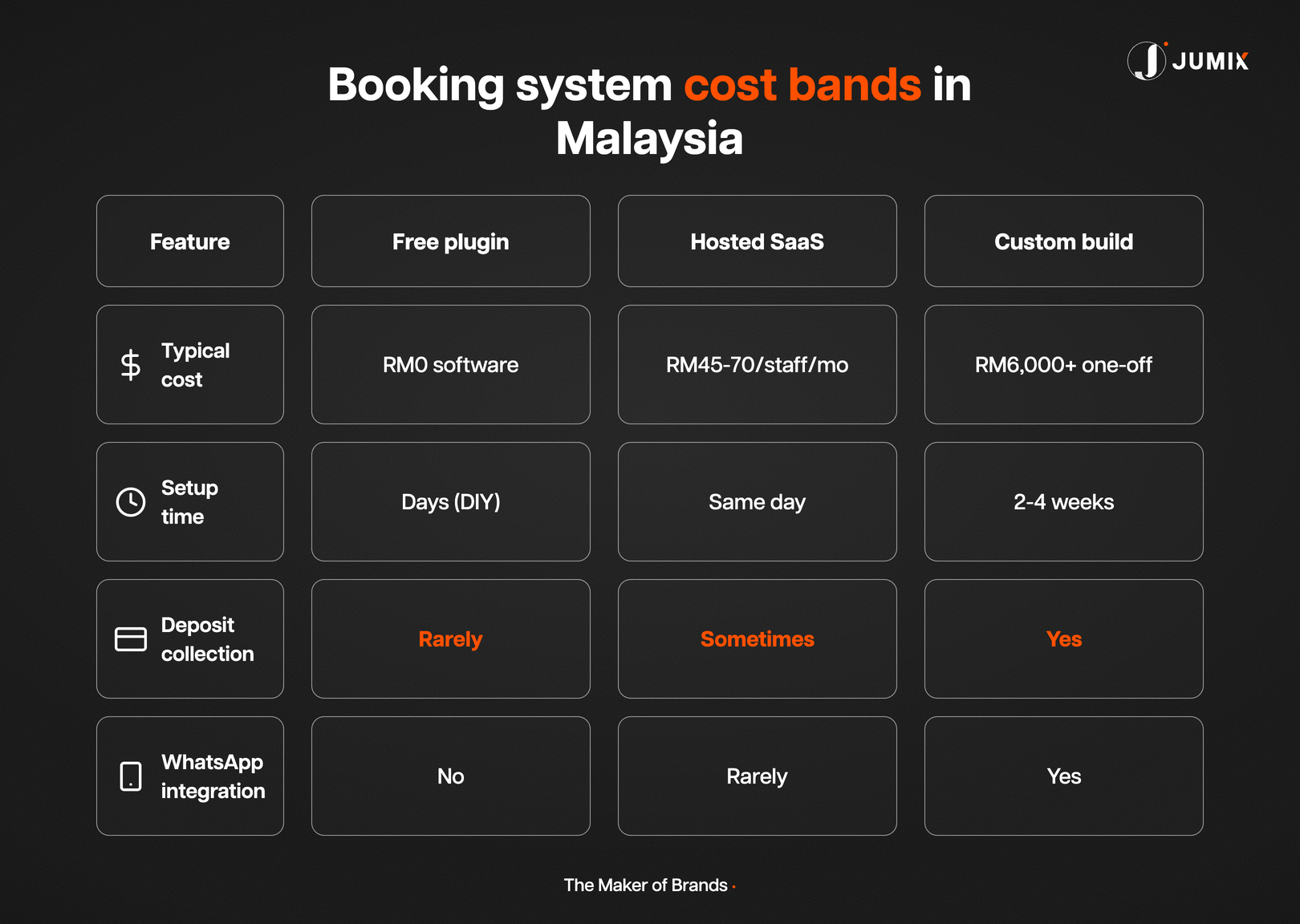
Free plugins rarely handle deposits well. Most hosted platforms support it as an add-on. A custom build can make it a required step before the slot confirms.
After the booking: how Orinx automates reminders, follow-ups and CRM records
Full disclosure: Orinx is the CRM and automation system we run at Jumix and set up for our clients. So read this section as a worked example, not a neutral review.
Orinx gives your website a booking calendar you can embed on any page. Customers pick a slot, answer a short form, and the appointment lands in your calendar, synced with Google Calendar.
The booking is only the start. Most of the admin happens after it, and that’s the part Orinx automates.
- Confirmations and reminders on WhatsApp, SMS or email. Each calendar sends its own messages when a slot is booked, rescheduled or cancelled, plus reminders before the appointment.
- Customers change bookings themselves. Every confirmation carries a cancel and a reschedule link, and you decide how close to the appointment those links stop working.
- Follow-ups that run on their own. A booking can start a workflow: a thank-you after the visit, a review request, or a “we missed you” message when someone doesn’t turn up.
- Booking answers land in the right CRM fields. Questions on the booking form (branch, service, budget, how they found you) save straight into the customer’s contact record, so nobody retypes them.
- Your team gets told too. A new booking can alert the right staff member or move the lead to the next stage of your sales pipeline.
Here’s what one booking can set off without anyone touching it.
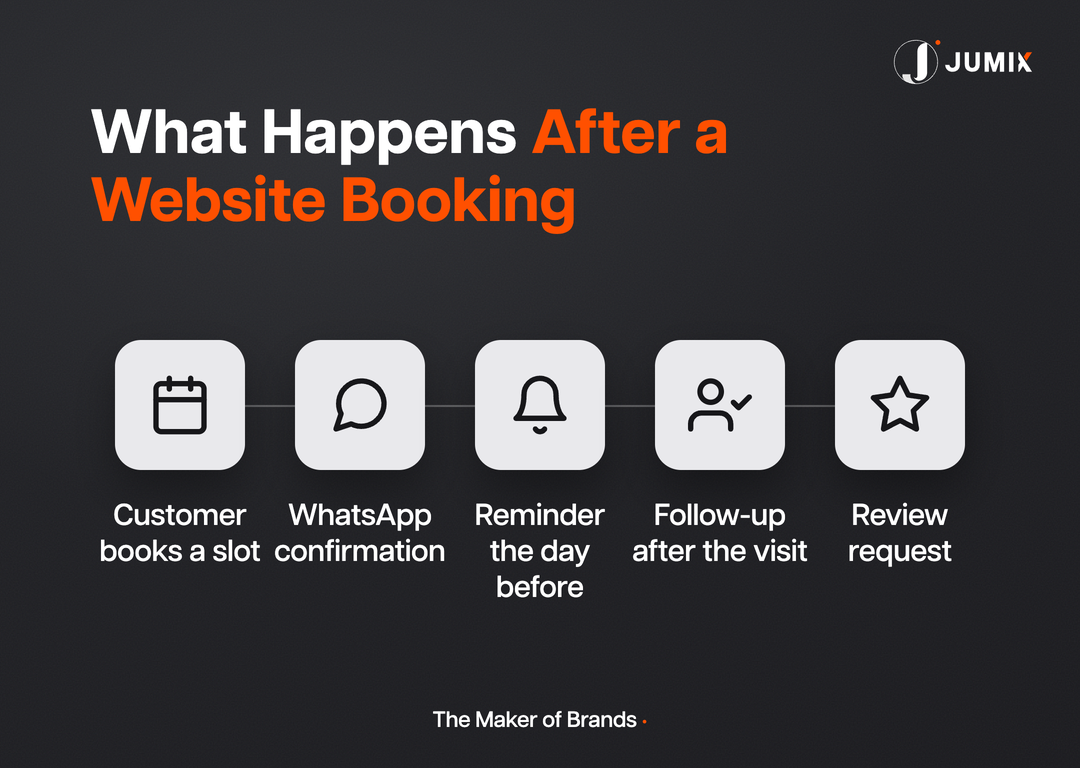
Picture a clinic. A patient books a health screening at 11pm. They get a WhatsApp confirmation straight away, a reminder the day before, and a review request after the visit.
The front desk sees the appointment in the calendar the next morning. Every message the system sends is one your staff no longer has to remember.
Common mistakes when adding a booking system
I’ve seen a booking plugin slow a site down the moment it goes live, more times than I’d like.
Most never test the new widget against the site’s existing speed before switching it on.
Skipping deposits on high-value slots is the second one. A free 30-minute consultation can afford a no-show. A 2-hour spa treatment can’t.
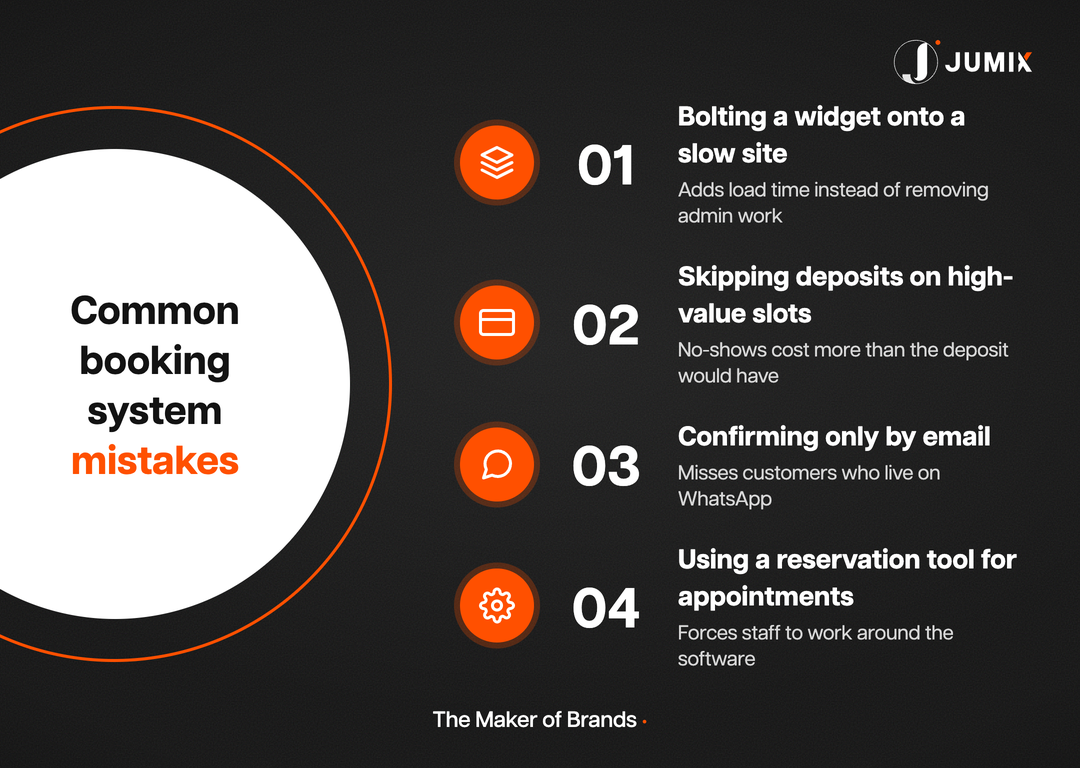
Confirming only by email is the third. It misses every customer who only checks WhatsApp.
And forcing a reservation tool to handle single-slot appointments, or the reverse, is the mistake that costs the most to undo later.
Fix the category first. Everything else is a setting.
FAQ
Is a free booking plugin enough for a small Malaysian business?
Yes, for a single operator with simple scheduling needs. It stops being enough once you need deposits, multiple staff calendars, or WhatsApp confirmations.
Can a website booking system send WhatsApp reminders automatically?
Yes. Systems like Orinx send WhatsApp, SMS or email confirmations and reminders on their own once a slot is booked. Check your provider’s current WhatsApp message pricing before you build a high-volume reminder flow.
Can a booking system collect deposits in Malaysia?
Yes. Most hosted platforms and custom builds connect to a Malaysian payment gateway like Fiuu, Adaptis or Stripe to collect a deposit at the point of booking.
Does a booking system need its own mobile app?
No. A mobile-friendly booking page, reachable from a link in WhatsApp or Instagram, covers most Malaysian SMEs. An app adds cost most businesses don’t recover.
How long does it take to add a booking system to an existing website?
A plugin or hosted platform can go live the same day. A custom build that handles deposits and multiple calendars typically takes 2 to 4 weeks.
What’s the difference between a reservation system and a table-booking system?
A reservation system books a specific resource, like a room, across a date range. A table-booking system books capacity for a time slot without assigning a specific table.
The bottom line
A plugin, a SaaS plan, or a custom build all exist at a price point most Malaysian businesses can reach.
Picking the right category before you pay for any of them is what actually matters, along with putting WhatsApp and a deposit in front of the slot instead of behind it.
Get those two decisions right and the booking system fades into the background, which is exactly where it should sit.
Jumix’s web design team builds the booking flow into the site itself, so it matches your brand and your actual customer behavior from day one.




Comments are closed for this article!